
The plan that survives is built into your systems, not filed in a drawer
What a Business Continuity Plan Actually Is
A business continuity plan is the set of decisions and arrangements that let a business keep running, or recover quickly, when something it depends on stops working. It names the critical business functions a company cannot pause for long, along with the systems, people, data and suppliers behind them, and sets out how each keeps going when the ordinary way of doing things is unavailable.
That definition is easy to write down and hard to make real. A plan that lives only as a filled-in template in a drawer tends to fail at the moment it is called on, because nobody remembers it exists or the business has changed since it was written. Continuity built into the systems you run on behaves differently, holding without anyone needing to consult it. This is less about fire and flood than about the disruptions that actually hit a business like yours, which is where business continuity management and operational resilience begin.
The point: A plan filed away is only as good as your memory of it under pressure. Continuity designed into your everyday systems works whether or not anyone reaches for the folder.
What Actually Goes Wrong
Search for continuity advice and the results lead with fire, flood, extreme weather and evacuation drills. Those events are real, but they rarely stop a software-run business of ten to a hundred people. The disruptions that actually halt work are digital and human, reaching you through your systems and your team rather than your building. Nearly all of them trace back to a single point of failure, the one person, spreadsheet, or supplier your business cannot run without. Sound business continuity starts by naming these honestly rather than planning for the storm that makes the news.
A key person leaves
The one who truly understands how a system or process holds together resigns, and the working knowledge goes with them. This is key-person risk, or your bus factor.
A server or machine dies
The box a critical job runs on fails overnight, and the task it quietly handled stops. A dead server with no tested restore turns a fault into a scramble.
A tool you depend on disappears
A SaaS product is sunset, or the vendor changes its terms beyond what you agreed. A SaaS sunset can pull a workflow away with a few weeks' notice.
Ransomware locks your files
A cyber-attack encrypts the data your work sits on and demands payment to release it. Ransomware turns every unbacked-up file into a hostage.
The shared spreadsheet breaks
The workbook everyone relies on is corrupted, or a formula shifts and nobody notices for weeks. A broken spreadsheet spreads wrong numbers quietly.
A supplier or contractor vanishes
A supplier or contractor goes quiet, folds, or stops answering, and part of your delivery stalls. A vanished supplier leaves you covering work you assumed was handled.
By this point most owners recognise more than one of these at once, and that overlap is what a continuity plan exists to handle.
A Business Continuity Plan for a Small Business: Impact and Risk in an Afternoon
Frameworks multiply this into pillars and phases, but a business continuity plan comes down to a short ordered set of moves: work out what would hurt most (business impact analysis), judge what is most likely to go wrong (risk assessment), decide how you would keep going or recover (recovery strategies), agree who does what (roles), and prove it works (testing). The versions written for large organisations wrap each move in a committee and stretch it over a quarter. A 25-person business needs a proportionate version it can finish in an afternoon, then the discipline to fix the top few things first.
The business impact analysis is the part worth slowing down for. List your critical business functions and rank them by how fast their loss actually bites: the point where an outage stops being an inconvenience and starts costing customers or cash is that function's maximum tolerable period of disruption (MTPD). Done honestly, this surfaces a quieter problem, a process or supplier relationship that lives only in one person's head, which is where a plan and capturing what only lives in one person's head start to overlap.
Risk assessment is where small businesses drown, so triage rather than catalogue. Score each threat on likelihood and impact, write the serious ones into a short risk register, and fix the top few. Planning for every conceivable event produces a document nobody finishes.
Business Continuity Plan vs Disaster Recovery Plan
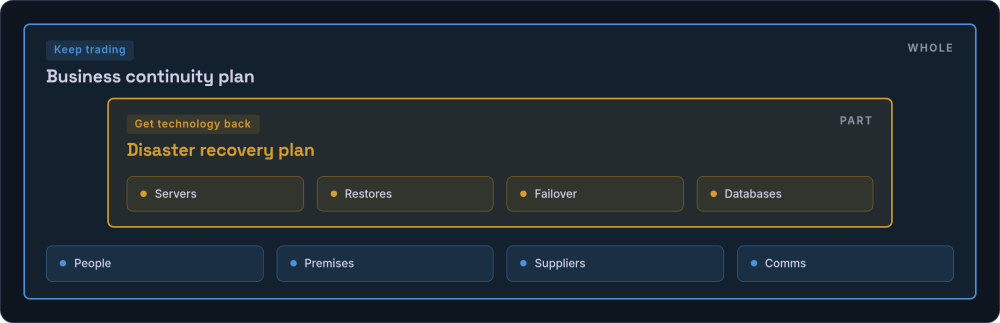
The two terms get used interchangeably, and that quiet mix-up weakens both. A disaster recovery plan handles one slice of the problem: getting technology and data back after an outage. Restoring servers, running failover, rebuilding databases from backups, that is IT recovery, and it matters. A business continuity plan asks the wider question of how the whole operation keeps trading when people, premises, suppliers or communication are hit as well. You likely need both, but the disaster recovery plan sits inside the continuity plan, not beside it.
| Aspect | Disaster recovery plan | Business continuity plan |
|---|---|---|
| Scope | IT systems and data | The whole operation |
| Question it answers | How do we get our technology back? | How do we keep trading? |
| Covers | Servers, restores, failover | People, premises, suppliers, comms, plus DR |
| Relationship | A component | The whole |
Which brings us to the part of disaster recovery almost nobody writes down: how software and data actually come back.
Software and Data Continuity: Where Your Business Actually Lives
A surprising number of owners are, in a real sense, renting their own business from someone whose name they half-remember. The website works, the invoices go out, and nobody has ever checked what they would actually hold in their hands if that person stopped answering emails. For a business that runs on software, continuity is decided long before any crisis, in the quiet details of who owns what. Five questions settle most of it.
Where does the code live?
Your source code should sit in a repository you can reach (GitHub, GitLab, Bitbucket), not only on your developer's laptop.
Who controls the domain and DNS?
Your domain wants to be registered in an account you own (at a registrar such as Nominet, Cloudflare, GoDaddy or 123 Reg), not your developer's personal account. DNS control is what lets you point the business elsewhere if you must.
Who holds the credentials?
Logins, keys and hosting accounts belong in a shared vault the business controls (1Password, Bitwarden), not one person's browser.
Can you actually export your data?
Not whether there is an export button, but whether you have exported your data and checked it is usable.
What happens if your developer disappears?
Someone else should be able to pick up the system, rather than it stopping with them.
The domain question catches people most often. A domain sitting in a developer's personal account is one of the commonest and quietest exposures a small business carries: nothing looks wrong until a renewal lapses or the relationship sours, and then the address itself is out of reach. The same misplaced trust shows up in email. Microsoft 365 and Google Workspace replicate your data across their infrastructure for availability, but replication is not a backup against accidental deletion, a compromised account, or a subscription nobody renewed. Each answer above is a single point of failure hiding as a convenience, and the harder cases are covered in what to do when the developer has already vanished. Ownership on paper is what turns a disruption into an inconvenience rather than an ending.
RTO and RPO: Two Numbers You Can Actually Cost
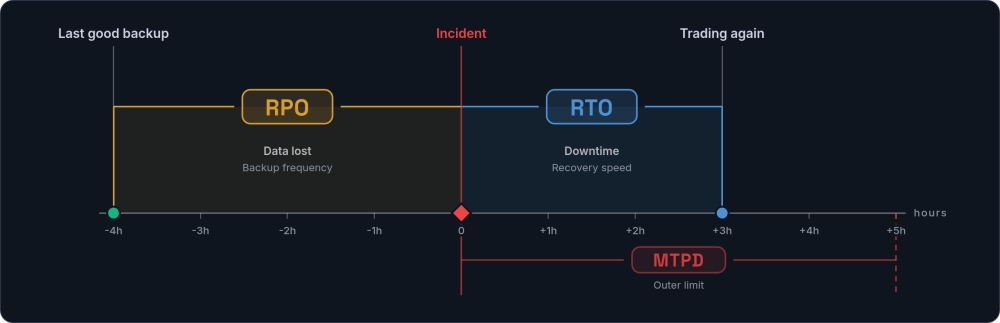
Two acronyms sit at the centre of any continuity conversation, and both are business decisions long before they are technical ones. Recovery time objective (RTO) is how long you can afford to be down before the outage really hurts; recovery point objective (RPO) is how much data, measured in time, you can afford to lose. A shop that can invoice from paper for a day carries a very different RTO from an online retailer losing sales every minute it is offline. Tighter targets cost more to hit, so the work is to set them deliberately against your critical business functions rather than discover them halfway through an incident.
| Term | Plain-English question | What it drives |
|---|---|---|
| RTO (recovery time objective) | How long can we be down before it really hurts? | How fast your recovery has to be, and what that costs |
| RPO (recovery point objective) | How much data can we afford to lose? | How often you must back up |
Your RPO is really a statement about your last good backup: if you can tolerate losing an hour, a backup from more than an hour ago is not enough. That number only means something if a backup taken at that point actually restores, which is where the next section picks up. Beyond both sits your maximum tolerable period of disruption (MTPD), the outer limit past which the damage stops being painful and becomes existential. RTO and RPO are the dials you set inside that limit.
Backups That Actually Work: Restore-Testing, 3-2-1 and Ransomware
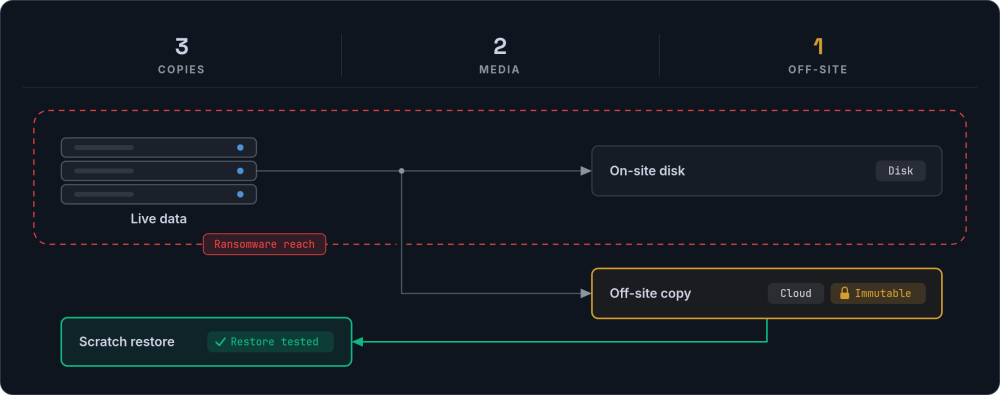
That last-good-backup point only holds if the restore behind it works, and restores fail quietly. An untested backup is a hope, not a plan. The job may have stopped months ago behind a green tick, the file may be corrupt, or the restore may take three days nobody budgeted for. You tend to find out at the moment you can least afford to.
An immutable or offline copy matters because modern ransomware deliberately seeks out and encrypts connected backups alongside live data, so recovery depends on a copy it could not reach and on rebuilding from a known-good point. The NCSC publishes practical UK guidance on ransomware and backups, and Cyber Essentials sets a baseline any small business can certify against. Treating backups, monitoring and restore-testing as an ongoing operational discipline rather than a one-off setup is what keeps that known-good point good.
The 72-hour clock: a personal-data breach that meets the threshold must be reported to the ICO within 72 hours of you becoming aware of it.
That clock is short, so your incident response plan should name the person who decides whether it has started, rather than leaving the call to whoever happens to notice.
Roles, Recovery Order and Rehearsal
When an incident lands, two jobs come before any technical fix: someone decides, and someone communicates. At ten to a hundred people, that means naming a single decider plus a named deputy who steps in when the decider is on a plane or off sick, not convening a committee while the clock runs. Write down roles and responsibilities alongside an out-of-hours contact list that has actually been dialled, so it reaches real people rather than a disconnected desk phone. The incident communication plan sets who tells customers, staff, suppliers and insurers, and in what order, so the account stays consistent while the failover runs.
First 24 hours
Contain it, switch to manual fallback, tell the people who need to know.
Days 2 to 7
Restore critical business functions in priority order from the impact analysis.
Days 8 to 14
Bring back the rest, then review what the plan got wrong.
The order things come back in is not a fresh judgement made under pressure. It comes straight from the business impact analysis you did earlier: most critical functions first, everything else behind them. Those steps live in your documented recovery procedures so the person acting is not the only person who knows them. Prove the whole thing with a tabletop exercise: gather the people who would respond, walk through one real scenario from earlier (a dead server, a locked file, a vanished developer), and watch where the phased recovery turns out to be a guess. That is where the plan stops being theoretical.
No single key-holder: name a deputy for every critical role, and keep credentials, keys and admin logins in a shared vault. A plan that hangs on one person being reachable, or one key-holder answering the phone, has a single point of failure built into it.
Your Business Continuity Plan Lives in Your Systems, Not the Folder
A document depends on someone remembering it exists, finding it, and following it correctly while the phones are ringing and half the team is asking what to do next. Continuity built into the way you already work carries the business without that act of recall: processes written down as a single source of truth, backups you have actually restored, no one person holding the only key, data and code you own and can export at will. The plan is worth writing. The writing is the smaller half of the work, and the systems behind the answers are the larger half.
Is a business continuity plan template enough?
A template is a fine place to begin. The GOV.UK Business Continuity Management Toolkit gives you a workable skeleton, and free templates from the FSB, from local resilience forums, and guidance from the Business Continuity Institute (BCI) will fill in most of the headings. The value is not in the form, though. It is in the honesty of the answers you write, and more in whether your systems make those answers true when someone tests them. ISO 22301 is the formal international standard for all of this, but a business of thirty people almost never needs certification to have a plan that works.
Insurance is not a plan: business interruption insurance pays out money after an event. It does not restore your ability to trade. It belongs in the plan, not instead of it.
What you are building towards is a quiet thing: a business that keeps trading when a person, a server, or a supplier is suddenly gone.
See where your business is exposed
We build the systems that carry your processes, so continuity holds when a person, a server, or a supplier is suddenly gone.
Start a conversation →