
Signs You Need Real Business Systems
Most growing businesses start with spreadsheets, and the database vs spreadsheet question never comes up. Spreadsheets are fast to set up, flexible enough for most early problems, and familiar to nearly everyone. For the first few years, they work. Orders tracked in a shared Google Sheet. Client details in an Excel file. Project status updated manually each Friday.
Then something shifts. The file gets slower. Two people edit at the same time and one overwrites the other. Someone changes a formula and nobody notices for weeks. The spreadsheet that once made everything visible now makes everything uncertain.
Knowing when to stop is harder than it sounds, because spreadsheets rarely break dramatically. They degrade quietly, one workaround at a time. Eventually the business is running on a system that nobody trusts but everybody depends on. At its heart this is a structural mismatch: a tool built for individual analysis is being asked to do the job of multi-user software.
A common pattern: Most growing businesses accumulate between 5 and 15 operational spreadsheets before the friction becomes impossible to ignore. The trigger is rarely a single dramatic failure. It is a quiet accumulation. Three versions of the same stock sheet with different totals. A formula in column G that nobody dares touch. A Friday reconciliation ritual that takes someone's entire afternoon. The breaking point arrives when the business realises it is spending more time managing its spreadsheets than managing its operations.
This page is for the business owner who already feels that friction. You know something is wrong. You may not yet know what the alternative looks like or when to stop using spreadsheets and make the move. Here is a practical framework for recognising the signs, understanding the real costs, and planning a transition from spreadsheets to software that actually fits how your business operates.
What Spreadsheets Do Well (and Where They Stop)
Spreadsheets are genuinely excellent tools for certain jobs. Dismissing them entirely would be dishonest. They are unmatched for ad-hoc analysis, one-off calculations, financial modelling, and quick prototyping. When one person needs to explore a data set or test a hypothesis, a spreadsheet is often the fastest path from question to answer.
When spreadsheets are still the right tool: Even businesses with proper operational systems keep spreadsheets for certain jobs. Ad-hoc analysis, financial modelling, one-off calculations, and personal data exploration are all fair game. The goal is not to eliminate spreadsheets. It is to stop using them for jobs they were never designed to do.
The problems begin when a spreadsheet outgrows its original purpose. A one-off calculation becomes a weekly report. A personal tracking sheet becomes the team's operational record. A prototype becomes the production system. Each step feels small. Each step adds fragility. This is what outgrowing Excel actually looks like: not a sudden failure, but a slow accumulation of workarounds.
The spreadsheet data management problems that matter are not about rows or columns. They are about what happens when a tool designed for individual analysis becomes the foundation for team-wide operations. Spreadsheets are not designed for:
The Warning Signs: When to Stop Using Spreadsheets
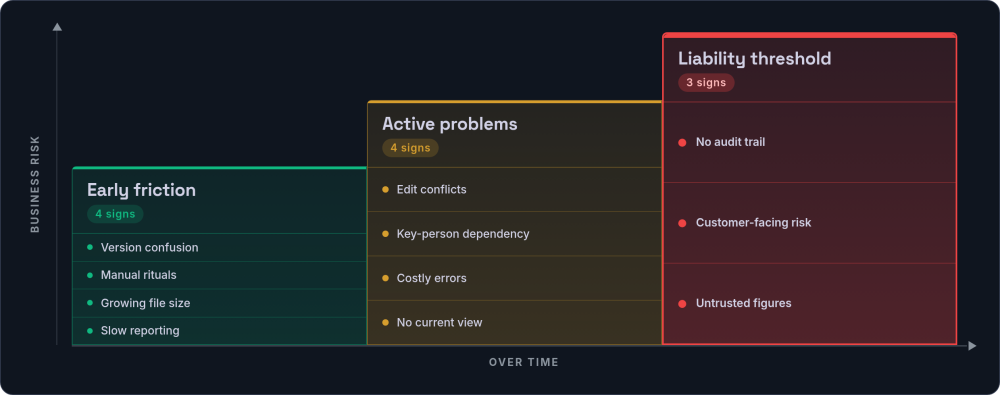
Outgrowing spreadsheets rarely happens overnight. It follows a pattern. Recognising where your business sits on this spectrum helps you respond before a small problem becomes a serious one.
Early Friction
These signs mean you are approaching the limits. The spreadsheet still works, but it requires increasing effort to keep it working. If you spot two or more of these, it is worth auditing how much time your team actually spends maintaining spreadsheets each week.
Version confusion
Multiple copies of the same file circulate by email. Nobody is certain which is current. File names include "v3_final_FINAL_updated". A quick diagnostic: search your shared drive for files with similar names. If you find three or more versions of any operational spreadsheet, version control has already failed.
Manual rituals
Someone spends time each week copying data from one sheet to another, reconciling figures, or formatting reports that could be generated automatically. Track this for a fortnight: every time someone copies data between spreadsheets, note how long it takes. The total is usually higher than anyone expects.
Growing file size
The spreadsheet takes noticeably longer to open. Calculations pause while the formula engine catches up. Performance degrades with each month of accumulated data. Google Sheets starts struggling noticeably above 50,000 cells with formulas. Excel handles more, but performance drops sharply once files exceed 20-30MB.
Time-consuming reporting
Producing a weekly or monthly report requires manually pulling data from multiple sheets, reformatting, and checking for consistency. If your reporting process involves copying figures from one spreadsheet into another to build a summary, that is a sign that your data structure has outgrown the tool.
Active Problems
These signs mean the spreadsheet is actively causing harm. The costs are real and measurable, even if nobody has tallied them up. At this stage, the question is not whether something will go wrong, but how often and how badly.
Concurrent access conflicts
Two people need to edit the same file simultaneously. One waits, or both edit and one set of changes is lost. Google Sheets reduces this, but introduces a different problem: two people editing the same row at the same time can still produce inconsistent data, and there is no locking mechanism to prevent it.
Key-person dependency
One person understands the formulas, macros, VBA scripts, and hidden sheets. When they are on holiday, off sick, or hand in their notice, the business loses access to critical operational data. If that person has been building Excel automation to hold things together (auto-populating fields, generating reports, syncing between workbooks), the dependency runs deeper still. A practical test: ask someone other than the creator to explain your most important spreadsheet. If they cannot, that is a business continuity risk, not just a spreadsheet problem.
Material errors with business impact
A pricing error reaches a customer. A stock figure is wrong and an order cannot be fulfilled. An invoice goes out with the incorrect amount. Keep a log of data errors for one month. Note where each error originated, when it was caught, and what it cost to fix. This log becomes the business case for change.
Inability to see current state
Nobody can answer "where are we right now" without opening several files and cross-referencing manually. When a simple operational question (how many orders are open, what the current stock level is, which invoices are overdue) takes more than 30 seconds to answer, the data structure is wrong.
The Liability Threshold
At this stage, the spreadsheet is not just a limitation. It is a business risk.
No audit trail
For regulated operations or financial reporting, there is no reliable record of who changed what and when. The FCA, CQC, and SRA all have data management compliance expectations that spreadsheets make very difficult to satisfy at scale. It is possible to layer controls on top, but in practice few businesses manage it reliably, and proper audit trail systems are the standard remedy.
Customer-facing processes dependent on spreadsheets
Quotes, orders, or service delivery rely on a spreadsheet that could break, be edited incorrectly, or simply lose data. If a customer-facing error would require a manual trawl through spreadsheet history to diagnose, the risk is already too high.
Financial decisions based on uncertain data
The business makes resource, hiring, or investment decisions using figures that nobody fully trusts. A useful exercise: ask three people in different roles to independently produce the same figure (total revenue this month, number of active customers, current stock value). If the numbers do not match, the data cannot be trusted for decision-making.
If you recognise several items from the second or third tier, your spreadsheets have already broken. The question is not whether to move, but how and when.
The Hidden Costs of Spreadsheet Dependency
The most dangerous thing about spreadsheet limitations is that their costs are largely invisible. Nobody sends an invoice for "time lost to spreadsheet workarounds." The costs accumulate in silence.
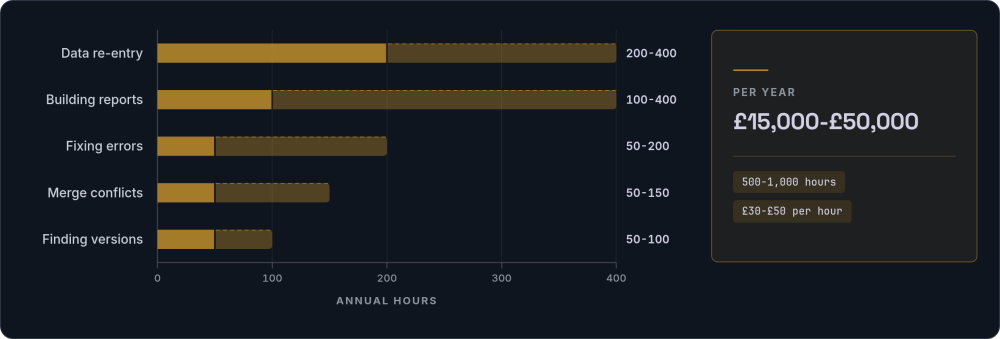
| Activity | Time per occurrence | Annual hours (typical) |
|---|---|---|
| Data re-entry between systems | 10-15 minutes, multiple times daily | 200-400 hours |
| Finding the correct version | 5-10 minutes, several times weekly | 50-100 hours |
| Fixing data entry errors | 15-60 minutes, weekly | 50-200 hours |
| Building reports manually | 30-120 minutes, weekly | 100-400 hours |
| Resolving conflicts and merges | 15-45 minutes, weekly | 50-150 hours |
What this adds up to: For a team of 10 to 20 people relying on spreadsheets for core operations, the total typically lands between 500 and 1,000 hours per year. At a fully loaded cost of £30 to £50 per hour, that is £15,000 to £50,000 spent annually on work that software handles automatically. Add one pricing error per quarter reaching a customer, the risk that the one person who understands the master spreadsheet leaves, and 12 months of decisions made on data nobody fully trusts. The cost of waiting is not static. It compounds.
Beyond time costs, errors compound based on when they are detected. An error caught at entry costs almost nothing. An error caught during reporting costs hours of investigation. An error caught by a customer costs relationship damage. An error caught by a regulator costs whatever they decide it costs. A system with built-in data validation catches errors at entry. A spreadsheet catches them whenever someone happens to notice.
These are not theoretical risks. In October 2020, Public Health England lost 16,000 COVID test results. The data had exceeded Excel's row limit of 65,536 rows in the legacy .xls format, and the overflow was simply dropped.
The European Spreadsheet Risks Interest Group maintains a catalogue of documented spreadsheet failures across industries. The patterns are consistent: formula errors, version confusion, and manual processes that fail at scale. Research from EuSpRIG suggests that around 88% of spreadsheets contain errors, though most go undetected for months or years.
Spreadsheet vs Database: The Core Difference
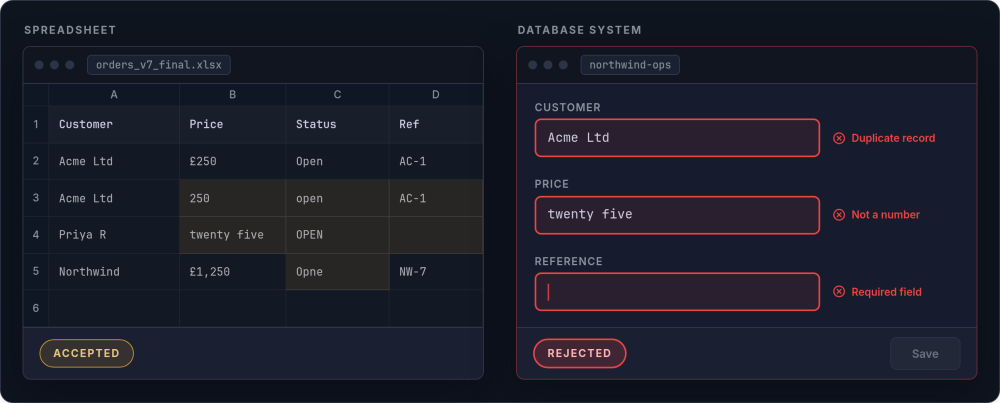
Understanding why spreadsheets fail at operational scale comes down to one concept: data integrity. A spreadsheet will accept anything you type into any cell. A database-backed system enforces rules about what data is valid before it is saved. This single difference drives most of the downstream problems businesses experience. When people ask about database vs spreadsheet for business use, or whether Excel is a database, the answer is structural. Excel stores data. A database governs it.
| Capability | Spreadsheet | Database-backed system |
|---|---|---|
| Data validation | Optional, easily bypassed. A dropdown list in cell D4 does not prevent someone pasting free text over it. | Enforced at entry, rejects bad data. A price field only accepts numbers. A status field only accepts defined values. |
| Required fields | No enforcement. Missing data goes unnoticed until someone needs it. | Missing data blocked at save. The record cannot be created without required information. |
| Unique identifiers | Duplicates go unnoticed. Two rows for the same customer with different details. No built-in way to prevent it. | Enforced uniqueness prevents duplicates. The system refuses to create a second record with the same identifier. |
| Relational data | Copy/paste between sheets. A customer's address appears in five places. Update one, forget the others. | Linked records, update once. Change the address in one place and every related order, invoice, and delivery reflects it. |
| Concurrent editing | Conflicts and overwrites. Even with Google Sheets, no row-level locking exists. | Multiple users, no data loss. Record-level locking prevents conflicting edits. |
| Audit trail | None or limited. Google Sheets version history shows changes but not why. Excel has no built-in audit trail. | Every change logged with user, timestamp, and previous value. Searchable and exportable. |
| Permissions | All or nothing. You can protect a sheet, but not control who sees which rows or edits which fields. | Row-level and field-level access control. Sales sees their own pipeline. Finance sees margins. Management sees everything. |
| Automation | Macros, VBA scripts, and Excel automation that break when the sheet structure changes. Maintenance falls to whoever wrote them. | Built-in workflow triggers. When an order status changes, notifications, stock updates, and invoicing happen automatically. |
| API access | Manual export/import. Data moves between systems via CSV files and human effort. | Automated data flows between systems. Orders from the website appear in the operations system without anyone touching them. |
This is not about complexity for its own sake. It is about whether your operational data can be trusted. A single source of truth requires data integrity guarantees that spreadsheets simply cannot provide once multiple people are editing the same records.
A practical way to think about it: If your spreadsheet needs dropdown lists, protected ranges, conditional formatting rules, and a README tab explaining how to use it, you have already built a crude database interface on top of a tool that was not designed for the job. At that point, the effort going into maintaining the spreadsheet would be better spent on a tool purpose-built for structured data.
From Spreadsheet to Software: Planning the Transition
The jump from a spreadsheet to a fully structured system is not a single leap. Most businesses move through stages, and understanding where you sit helps you choose the right next step. The detailed mechanics of moving your data across live in our guide to spreadsheet-to-system migration; this section covers the planning that comes first.
Individual
Personal spreadsheets, no coordination
Shared
Shared drive or Google Sheets, version conflicts begin
Structured
Templates, naming conventions, protected cells
Low-code
Airtable, Notion, or Smartsheet
Off-the-shelf or custom
Purpose-built tools, integrated via APIs
Most businesses making the upgrade from spreadsheets to software will land somewhere between low-code platforms and integrated off-the-shelf tools. Custom software is for businesses whose operational processes are a genuine competitive advantage and need to be encoded precisely. The build vs buy decision and the question of whether you should own or rent your critical business logic are both relevant here.
Wherever you land on that spectrum, the practical steps are the same. Businesses that succeed approach the move methodically rather than attempting a dramatic overhaul.
Audit your spreadsheet estate
List every spreadsheet in active use across the business. For each one, record: what data it holds, who uses it, how often it is updated, and whether it feeds into other spreadsheets or processes. Categorise each as either a genuine tool (used for analysis or modelling) or an operational system (used to run the business). The operational ones are your migration candidates.
A useful format for this audit: create a simple table with columns for spreadsheet name, owner, update frequency, number of users, and a one-line description of what breaks if the spreadsheet is unavailable for 48 hours. That last column clarifies priorities quickly.
Map the data flows
Draw out how data moves between your spreadsheets and other tools. For each data set, note where it originates, where it gets copied to, and where it ends up for reporting or decision-making. This map reveals duplication, manual bottlenecks, and the true dependencies between systems.
Pay particular attention to data that is entered more than once. Every instance of re-keying the same information is both a time cost and an error risk. These are the connections that a proper system eliminates.
Define requirements as outcomes
Write requirements in terms of what the business needs to be able to do, not what features a system should have. "We need to see all open orders and their status in one place" (see order management). "We need customer history accessible to anyone on the team" (see customer records). "We need to know current stock levels without ringing the warehouse."
Avoid specifying how the system should work at this stage. Focus on the problems you need solved and the questions you need answered. This keeps your options open during evaluation.
Evaluate your options
If 80% of your needs are standard (CRM, invoicing, project management, stock control), an off-the-shelf SaaS product is likely the right choice. If your processes are distinctive enough that off-the-shelf tools require significant compromise, custom software becomes the stronger option. Understanding the real cost of custom software often changes the calculation.
Low-code platforms like Airtable or Notion can serve as a useful middle ground, particularly for teams not ready for a full system migration. They enforce data structure while remaining flexible enough to evolve. Consider them as a stepping stone if the gap between your current spreadsheets and a full system feels too large.
Clean your data before migration
Spreadsheets accumulate inconsistencies: duplicate records, outdated entries, conflicting formats, free-text fields where structured data should be. Migrating dirty data into a clean system defeats the purpose. Budget time for data cleaning as a distinct phase.
Common cleaning tasks: standardising date formats, removing duplicate customer records, filling in missing required fields, and reconciling figures that appear in multiple spreadsheets with different values. This work is tedious but essential. Moving bad data into a good system just creates a well-organised mess.
Run in parallel, then cut over
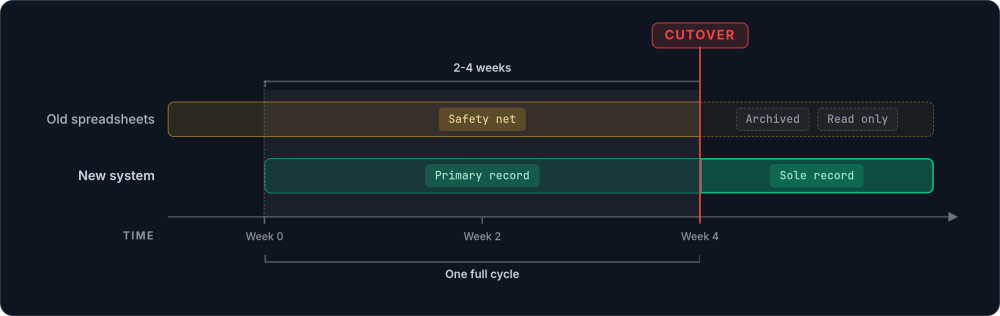
Operate both old and new systems simultaneously for a defined period, typically two to four weeks. During parallel running, the new system is the primary record and the old spreadsheets serve as a safety net. Set a firm cutover date in advance.
The parallel period should be long enough to cover at least one full operational cycle (weekly reporting, monthly close, or whatever cadence matters most). At the end of parallel running, archive the old spreadsheets and remove edit access. Do not leave them as an available fallback.
Invest in adoption, not just deployment
The biggest risk is not technical failure but adoption failure. People revert to familiar tools under pressure. Invest in training that covers real workflows, not just feature tours. Designate someone on the team as the internal champion who can answer questions and troubleshoot in the first few weeks.
The most common failure mode is a successful migration followed by a gradual drift back to spreadsheets. Someone creates "just a quick spreadsheet" to track something the new system does not cover perfectly, and within three months the old patterns have re-established themselves. Address gaps in the new system promptly rather than letting shadow spreadsheets fill them.
What Changes When You Move On
The difference between running a business on spreadsheets and running it on a proper system is not a marginal improvement. It is a structural change in how information flows and how decisions are made. The team spends more time on productive work and less on administrative overhead.
-
Data validation prevents errors at entry Fields have types, required values, and validation rules. A price that should be £250 cannot be saved as £25. The system rejects bad data rather than silently accepting it.
-
Multiple people work concurrently No more waiting for someone to close a file. No more version conflicts. Everyone sees the same current data. This is the foundation of a single source of truth.
-
Audit trails exist automatically Every change is recorded: who made it, when, and what the previous value was. For regulated industries, this is compliance built in.
-
Workflows execute automatically When an order is approved, the fulfilment team is notified without someone sending a Slack message. When an invoice is overdue, a reminder goes out without the Friday reconciliation ritual. Business process automation replaces the coordination that people used to do manually.
-
Real-time visibility replaces periodic reporting Well-designed dashboards show current operational state. No more waiting for the weekly report. The answer to "where are we?" is always one click away.
-
Growth does not add proportional complexity Adding 50% more customers does not mean 50% more administrative work. The system scales. The spreadsheet does not. This is essential for scaling without chaos.
-
Key-person dependency reduces The logic is in the system, not in someone's head. When the person who built the master spreadsheet is on holiday, the business continues to operate because the rules are encoded in software, not hidden in column G.
None of this requires a massive upfront investment or a year-long implementation. Focused systems that address the highest-priority pain points can be operational in weeks. The transition from spreadsheet to software is not about replacing everything at once. It is about moving the most painful, most costly processes first and building from there.
Ready to Start Planning
If your spreadsheets have started breaking, the next step is working out which ones to replace first and what to replace them with. The audit framework on this page will get you most of the way there. A discovery engagement takes the output of that audit and turns it into a specification, a realistic budget, and a clear plan for what to build first. And when the answer is to move off the sheets entirely, our spreadsheet-to-system migration service handles the whole move, from data cleaning to parallel running.
Start a conversation →